


Free Movies Streaming in Smart
AND Tutorial To SET BANDWITH USING XPLORE
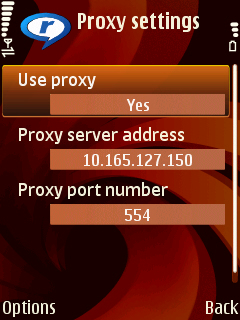
Use this Proxy
sa realplayer 10.165.127.150 port 554
Movie Channels
rtsp://10.165.127.150:80/movies/
TheDeparted.3gp
rtsp://10.165.127.150:80/movies/
300.3gp
rtsp://10.165.127.150:80/movies/
SupermanReturns.3gp
rtsp://10.165.127.150:80/movies/
GetSmart.3gp
rtsp://10.165.127.150:80/movies/
The11thHour.3gp
rtsp://10.165.127.150:80/movies/
TwoWeeksNotice.3gp
rtsp://10.165.127.150:80/
movies/Outbreak.3gp
rtsp://10.165.127.150:80/
movies/Constantine.3gp
rtsp://10.165.127.150:80/
movies/CityOfAngels.3gp
rtsp://10.165.127.150:80/
movies/
TheBridgesOfMadisonCountry.3gp
rtsp://10.165.127.150:80/movies/NoReservations.3gp
rtsp://10.165.127.150:80/movies/BloodDiamond.3gp
rtsp://10.165.127.150:80/movies/Assassins.3gp
1st. Go to E-XPLORER
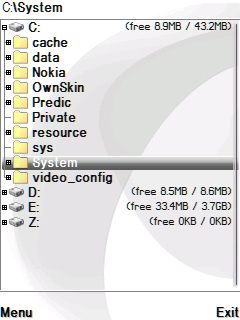
2nd.
C:\system\data\ at hanapin
ang
RNEngineUSER.cfg
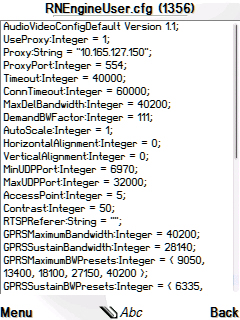
then edit w/ ansi editor
pag wala diyan,
click option>find file>RNEngineUSER.cfg
then FIND
SA MGA S60V3 NASA C:/VIDEO_CONFIG UNG RNEngineUSER.cfg
Settings:
GPRSsustainBANDWIDTH:integer=150000
EGPRSsustainBANDWIDTH:integer=300000
WCDMAsustainBANDWIDTH:INTEGER= 500000
THEN SAVE and try again to connect.
